Mixed Number Calculator (With Step-by-Step Solutions)
A Mixed Number Calculator helps you solve mixed number problems in seconds. It delivers accurate answers without manual calculations. Whether you need to add, subtract, multiply, or divide mixed numbers, this calculator handles every step for you. Enter your mixed numbers, choose an operation, and click Calculate. The calculator instantly finds the correct answer. It also simplifies the final result to its lowest terms whenever possible. This feature saves time and reduces mistakes.
The calculator automatically converts mixed numbers into improper fractions during the calculation. After solving the problem, it converts the result back into a mixed number when appropriate. This process follows standard fraction arithmetic taught in mathematics. Educational organizations, including the National Council of Teachers of Mathematics, emphasize understanding fractions as a foundation for mathematical learning. Every calculation includes a clear, step-by-step solution. You can follow each stage to understand how the answer was found. This makes the calculator useful for learning as well as checking your work.
The calculator works smoothly on desktops, laptops, tablets, and smartphones. You can use it at home, in school, or on the go without installing any software. Students can solve homework faster. Teachers can verify classroom examples. Parents can help children with confidence. Professionals who work with measurements, construction, recipes, or technical calculations can also use the calculator to save time and improve accuracy.
Whether you need a quick answer or want to understand the process, this Mixed Number Calculator provides a fast, reliable, and easy solution.
Interactive Mixed Number Calculator
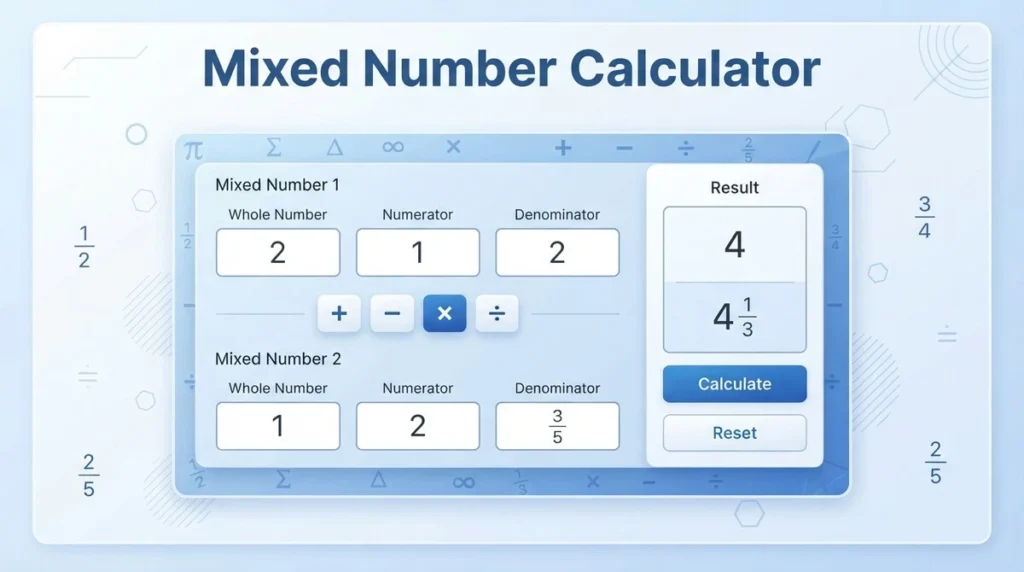
Use the interactive Mixed Number Calculator below to solve fraction problems quickly and accurately. Enter your values, choose an operation, and let the calculator do the work. It performs every calculation instantly and explains each step clearly.
Calculator Inputs
The calculator accepts two mixed numbers. Enter each value in separate fields to avoid input errors.
First Mixed Number
Enter the first mixed number using these fields:
- Whole Number – Enter the whole number part.
- Numerator – Enter the top number of the fraction.
- Denominator – Enter the bottom number of the fraction. It must be greater than zero.
Operation Selector
Choose the operation you want to perform between the two mixed numbers.
- Addition (+) – Find the sum of two mixed numbers.
- Subtraction (−) – Find the difference between two mixed numbers.
- Multiplication (×) – Multiply mixed numbers accurately.
- Division (÷) – Divide one mixed number by another.
Second Mixed Number
Enter the second mixed number using the same three fields:
- Whole Number
- Numerator
- Denominator
The calculator validates your inputs before solving the expression.
Calculator Buttons
The calculator includes simple controls for a smooth experience.
- Calculate – Solves the expression and displays the result instantly.
- Reset – Clears all input fields and results.
- Swap Values (Optional) – Exchanges the first and second mixed numbers with one click.
Results
After you click Calculate, the calculator displays a complete solution.
- Final Answer – Shows the correct result.
- Simplified Mixed Number – Reduces the answer to its lowest terms.
- Improper Fraction – Displays the equivalent improper fraction when applicable.
- Decimal (Optional) – Shows the decimal equivalent for quick reference.
- Step-by-Step Solution – Explains each stage of the calculation, including fraction conversion, arithmetic operations, simplification, and the final mixed number.
This simple layout helps students, teachers, parents, and professionals solve mixed number problems with speed and confidence.
What Is a Mixed Number?
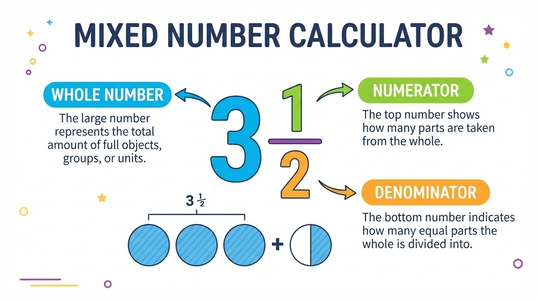
A mixed number combines a whole number and a proper fraction. It represents a value greater than one in a simple and easy-to-read form. For example, 3½ means 3 whole units and 1 half of another unit. People often use mixed numbers in mathematics, cooking, construction, and measurement because they are easier to understand than large improper fractions.
Mixed Number vs. Fraction
A fraction represents part of a whole. It can be a proper fraction or an improper fraction. A mixed number combines a whole number with a proper fraction.
For example:
- 3½ is a mixed number.
- ½ is a proper fraction.
- 7/2 is an improper fraction.
- 3½ and 7/2 have the same value. They use different forms.
A Mixed Number Calculator converts between these forms automatically whenever a calculation requires it.
Examples of Mixed Numbers
Here are a few common examples:
- 3½ = 3 wholes and 1/2
- 7¾ = 7 wholes and 3/4
- 12⅝ = 12 wholes and 5/8
These examples show how a whole number and a fraction work together to represent one value.
Components of a Mixed Number
Every mixed number has three main parts.
Whole Number
The whole number appears first. It shows the complete units. In 7¾, the whole number is 7.
Numerator
The numerator is the top number of the fraction. It shows how many equal parts you have. In 7¾, the numerator is 3.
Denominator
The denominator is the bottom number of the fraction. It shows how many equal parts make one whole. In 7¾, the denominator is 4.
Understanding these three components makes it easier to use a Mixed Number Calculator, solve fraction problems, and check your answers with confidence.
How to Use the Mixed Number Calculator
Our Mixed Number Calculator makes fraction calculations quick and simple. Follow these five steps to get accurate results with a complete solution.
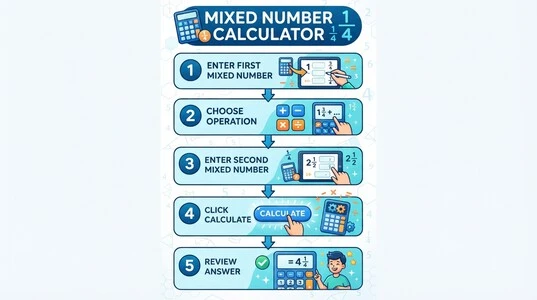
Step 1: Enter the First Mixed Number
Type the first mixed number into the input fields.
Enter:
- The whole number
- The numerator
- The denominator
Double-check that the denominator is greater than zero before you continue.
Step 2: Choose the Operation
Select the calculation you want to perform.
You can choose:
- Addition (+)
- Subtraction (−)
- Multiplication (×)
- Division (÷)
The calculator uses the selected operation to solve the expression correctly.
Step 3: Enter the Second Mixed Number
Enter the second mixed number using the same three fields.
Provide:
- Whole number
- Numerator
- Denominator
Make sure both mixed numbers are complete before calculating.
Step 4: Click Calculate
Press the Calculate button to solve the problem.
The calculator instantly:
- Converts mixed numbers into improper fractions when needed.
- Performs the selected arithmetic operation.
- Simplifies the result to its lowest terms.
- Converts the answer back into a mixed number, if appropriate.
Step 5: Review the Answer and Solution
The calculator displays a complete and easy-to-read result.
You will see:
- The final answer
- The simplified mixed number
- The equivalent improper fraction
- The decimal value (when available)
- A step-by-step solution that explains every stage of the calculation
Reviewing each step helps you understand the process, verify your work, and build confidence when solving mixed number problems.
Supported Mixed Number Operations
This Mixed Number Calculator supports the four basic arithmetic operations. It solves each problem accurately, simplifies the result, and shows every calculation step. You only need to enter your values and choose the operation.
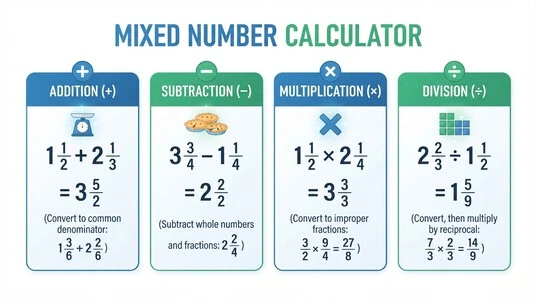
Addition (+)
Use the calculator to add mixed numbers in seconds. It performs the calculation automatically and simplifies the final answer to its lowest terms whenever possible.
Subtraction (−)
Choose subtraction to find the difference between two mixed numbers. The calculator handles the calculation accurately and presents the result in a clear format.
Multiplication (×)
Select multiplication to multiply mixed numbers quickly. The calculator processes the expression, reduces the answer when possible, and displays the final result.
Division (÷)
Use division to divide one mixed number by another. The calculator completes the operation, simplifies the answer, and provides a step-by-step solution for easy verification.
No matter which operation you choose, the Mixed Number Calculator delivers fast, accurate results while keeping every answer easy to read and understand.
Calculator Input Fields Explained
The Mixed Number Calculator uses simple input fields to ensure accurate calculations. Enter each value in the correct field to get the best results.
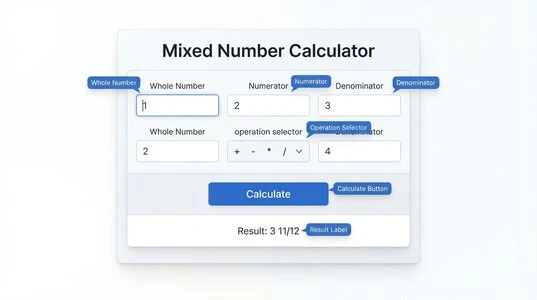
Whole Number Field
Enter the whole number part of your mixed number in this field.
Examples:
- 3 in 3½
- 7 in 7¾
- 12 in 12⅝
If your value contains only a fraction, enter 0 as the whole number.
Numerator Field
Enter the numerator, which is the top number of the fraction.
Examples:
- 1 in 3½
- 3 in 7¾
- 5 in 12⅝
The numerator represents the number of equal parts you have.
Denominator Field
Enter the denominator, which is the bottom number of the fraction.
Examples:
- 2 in 3½
- 4 in 7¾
- 8 in 12⅝
The denominator shows how many equal parts make one whole.
Input Rules
Follow these simple rules to avoid errors and ensure accurate results.
- The denominator cannot be zero. Division by zero is undefined in mathematics.
- The whole number may be zero. Use 0 when your value is only a fraction, such as 0 3/5.
- The calculator validates every input. It checks for missing values, invalid fractions, and incorrect entries before solving.
- The calculator automatically reduces fractions. It simplifies equivalent fractions to their lowest terms whenever possible, making the final answer easier to read.
Correct input helps the Mixed Number Calculator produce fast, accurate, and reliable results every time.
Negative Mixed Numbers
The Mixed Number Calculator supports both positive and negative mixed numbers. You can solve expressions that include one or more negative values without changing your input format.
Supported Negative Values
Place the minus sign (-) before the whole number to enter a negative mixed number.
Examples:
- -2 1/3
- -5 7/8
The calculator recognizes these values automatically and processes them correctly.
How the Calculator Processes Negative Mixed Numbers
When you enter a negative mixed number, the calculator first validates your input. It then converts the mixed number into an equivalent improper fraction while preserving its negative sign. Next, the calculator performs the selected operation. After completing the calculation, it simplifies the result to its lowest terms. If appropriate, it converts the final answer back into a mixed number.
The calculator also displays a step-by-step solution, so you can verify each stage of the calculation with confidence. Whether you enter one negative mixed number or combine positive and negative values, the Mixed Number Calculator delivers fast, accurate, and reliable results.
Multiple Mixed Numbers
The Mixed Number Calculator can also handle expressions with multiple mixed numbers, if your calculator version supports them. This feature saves time when you need to solve longer calculations.
For example:
- 2½ + 3¼ + 4¾
Instead of solving each pair separately, you can enter the complete expression and calculate the result in one step. If your calculator supports only two mixed numbers at a time, you can still solve longer expressions through sequential calculations. Calculate the first two numbers, then use the result with the next mixed number until you complete the expression.
Order of Operations
When an expression contains different arithmetic operations, the calculator follows the standard order of operations. It completes multiplication and division before addition and subtraction unless parentheses change the order. This approach ensures every calculation stays accurate and consistent with standard mathematical rules. Whether you solve two mixed numbers or a longer expression, the Mixed Number Calculator delivers accurate results, simplifies the final answer, and provides clear step-by-step calculations.
Step-by-Step Solution Feature
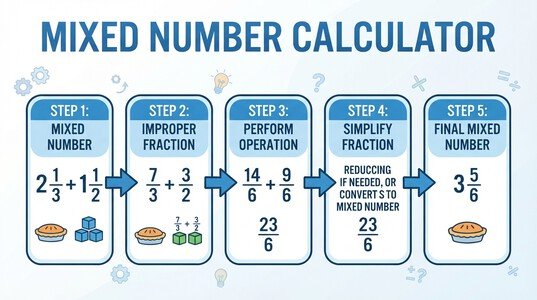
The Mixed Number Calculator does more than display the final answer. It explains every stage of the calculation, making it easier to understand and verify the result. This feature helps students learn fraction operations, teachers demonstrate examples, and anyone check their work with confidence.
How the Calculator Solves the Problem
After you click Calculate, the calculator follows a clear sequence.
1. Convert Mixed Numbers
The calculator converts each mixed number into an equivalent improper fraction when required. This step prepares the values for accurate arithmetic.
2. Perform the Selected Operation
Next, the calculator performs the selected operation. It supports addition, subtraction, multiplication, and division of mixed numbers.
3. Simplify the Fraction
The calculator reduces the resulting fraction to its lowest terms. It uses the greatest common divisor (GCD) to simplify equivalent fractions whenever possible.
4. Convert Back to a Mixed Number
If the final value is greater than one, the calculator converts the simplified improper fraction back into a mixed number.
5. Display the Final Answer
Finally, the calculator displays:
- The simplified mixed number
- The equivalent improper fraction
- The decimal value (when available)
- A complete step-by-step solution
This structured approach makes every calculation easy to follow. It also helps you understand how the answer was produced instead of simply showing the result.
Common Mixed Number Examples
The following examples show how the Mixed Number Calculator handles the four basic arithmetic operations. Enter the values, choose an operation, and the calculator finds the answer automatically.
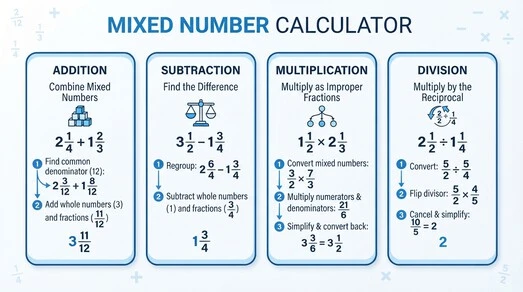
Example 1: Addition
Expression: 2½ + 1¾
Result: 4¼
The calculator adds both mixed numbers and simplifies the final answer.
Example 2: Subtraction
Expression: 5⅔ − 2¼
Result: 3⁵⁄₁₂
The calculator subtracts the values and reduces the fraction when needed.
Example 3: Multiplication
Expression: 2½ × 1⅕
Result: 3
The calculator multiplies the mixed numbers and returns the simplified result.
Example 4: Division
Expression: 4½ ÷ 1½
Result: 3
The calculator divides the mixed numbers and displays the answer in its simplest form. These examples show how the Mixed Number Calculator solves different types of mixed number problems quickly, accurately, and with step-by-step solutions.
Conversion Capabilities
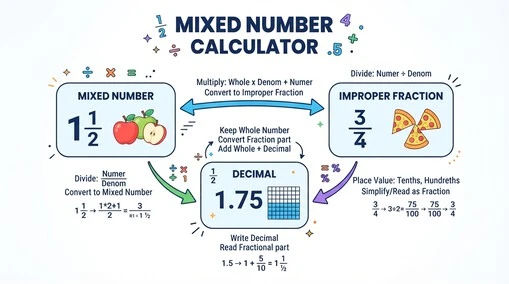
The Mixed Number Calculator offers built-in conversion tools to make fraction calculations faster and easier. It performs these conversions automatically whenever they are needed during a calculation.
Mixed Number to Improper Fraction
The calculator converts a mixed number into an improper fraction before solving most arithmetic operations. This conversion improves accuracy and keeps every calculation consistent.
Improper Fraction to Mixed Number
After completing the calculation, the calculator converts the result back into a mixed number whenever appropriate. This format makes the answer easier to read and understand.
Mixed Number to Decimal
The calculator can also display the decimal equivalent of a mixed number. This option helps when you need decimal values for measurements, engineering, finance, or everyday calculations.
Note: Each conversion has its own dedicated calculator and detailed guide. Explore those pages if you want to learn the conversion process in depth.
Simplification Capability
The Mixed Number Calculator automatically simplifies every answer whenever possible. You do not need to reduce the fraction manually. The calculator returns the result in its simplest and easiest-to-read form.
Automatic Fraction Simplification
After completing the calculation, the calculator checks whether the numerator and denominator share a common factor. If they do, it reduces the fraction to its lowest terms.
For example, the calculator changes 6/8 into 3/4. Both values are equivalent fractions, but 3/4 is the simplest form.
Uses the Greatest Common Divisor (GCD)
The calculator uses the Greatest Common Divisor (GCD) to simplify fractions accurately. The GCD is the largest number that divides both the numerator and denominator without leaving a remainder. Using the GCD ensures every result appears in its simplest mathematical form.
Displays Answers in Lowest Terms
Every simplified answer is easier to read, compare, and use in future calculations. Whether the result is a fraction or a mixed number, the calculator displays it in lowest terms whenever possible. This automatic fraction simplification improves accuracy, reduces mistakes, and helps you understand the final answer more clearly.
Features of This Mixed Number Calculator
Our Mixed Number Calculator combines speed, accuracy, and ease of use in one simple tool. It helps you solve mixed number problems without manual calculations.
Key Features
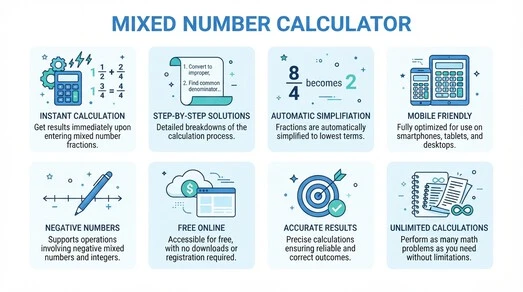
- Instant calculations for addition, subtraction, multiplication, and division.
- Step-by-step solutions that explain every stage of the calculation.
- Automatic fraction simplification to display answers in the lowest terms.
- Improper fraction support for accurate fraction arithmetic.
- Automatic result conversion between mixed numbers and improper fractions when needed.
- Optional decimal output for quick comparison and practical use.
- Support for negative mixed numbers and mixed positive and negative values.
- Input validation to catch invalid entries before calculation.
- Mobile-friendly design that works on phones, tablets, laptops, and desktops.
- Free online calculator with no installation or registration required.
- Unlimited calculations without daily usage limits.
- Accurate mathematical algorithms that follow standard rules of fraction arithmetic.
- Fast performance even for large numbers and complex expressions.
- Easy-to-use interface designed for beginners and experienced users alike.
Whether you are completing homework, checking answers, teaching fractions, or solving real-world problems, this Mixed Number Calculator delivers reliable results in seconds.
Formula and Calculation Logic
The Mixed Number Calculator follows a standard mathematical process to produce accurate results. It performs every step automatically, so you do not need to solve the problem by hand.
How the Calculator Works
When you click Calculate, the calculator completes the following steps:
- Converts mixed numbers into improper fractions when required.
- Finds the Least Common Denominator (LCD) if the operation requires matching denominators.
- Performs the selected arithmetic operation using standard fraction rules.
- Simplifies the resulting fraction to its lowest terms by using the Greatest Common Divisor (GCD).
- Converts the result back into a mixed number whenever appropriate.
This process ensures every answer is accurate, simplified, and easy to understand. It also provides consistent results for addition, subtraction, multiplication, and division of mixed numbers.
Common Input Errors
The Mixed Number Calculator checks every input before solving your expression. This validation helps prevent incorrect calculations and provides reliable results.
Zero Denominator
A denominator cannot be 0. Division by zero is undefined in mathematics. If you enter a zero denominator, the calculator displays an error and asks you to enter a valid denominator.
Missing Numerator
Every fraction needs a numerator. If you leave the numerator field empty, the calculator prompts you to complete the missing value before continuing.
Invalid Fraction
The calculator checks each fraction for valid input.
For example, it identifies:
- Non-numeric characters
- Negative denominators
- Incomplete fractions
- Invalid formats
If it detects an issue, it asks you to correct the input before calculating.
Large Values
The calculator supports large whole numbers and fractions within its supported input limits. If a value exceeds the allowed range, the calculator notifies you and requests a smaller value.
Empty Fields
All required fields must contain valid numbers. If one or more fields are empty, the calculator highlights the missing information and prevents the calculation until you complete the form.
Smart Input Validation
The Mixed Number Calculator validates every entry before processing. This approach reduces errors, improves accuracy, and ensures every calculation starts with valid mathematical input.
FAQs About Mixed Number Calculator
What is a mixed number?
A mixed number combines a whole number and a proper fraction. For example, 3½ means three whole units and one-half of another unit.
How does a mixed number calculator work?
The calculator converts mixed numbers into improper fractions when needed. It performs the selected operation, simplifies the result, and converts the answer back into a mixed number if appropriate.
Can the calculator simplify fractions?
Yes. The calculator automatically simplifies fractions to their lowest terms by using the Greatest Common Divisor (GCD) whenever possible.
Does it support improper fractions?
Yes. The calculator accepts improper fractions as input and converts them into mixed numbers whenever appropriate.
Can it calculate negative mixed numbers?
Yes. You can enter positive or negative mixed numbers. The calculator processes the sign correctly and returns an accurate result.
Can I multiply mixed numbers?
Yes. The calculator multiplies mixed numbers instantly and displays the simplified answer with a step-by-step solution.
Can I divide mixed numbers?
Yes. The calculator divides one mixed number by another and presents the result in the simplest form.
Does it show steps?
Yes. Every calculation includes a step-by-step solution. You can review each stage and understand how the calculator reached the final answer.
Can I convert mixed numbers?
Yes. The calculator supports conversions between mixed numbers, improper fractions, and decimal values whenever needed.
Is this calculator free?
Yes. You can use the Mixed Number Calculator online at no cost. There are no subscription fees or usage limits.
Does it work on mobile?
Yes. The calculator works on smartphones, tablets, laptops, and desktop computers. You only need a modern web browser.
Why is my denominator invalid?
A denominator must be a positive number greater than zero. The calculator displays an error if you enter 0, leave the field empty, or use an invalid value. Correct the denominator and calculate again.
Why Use This Mixed Number Calculator?
The Mixed Number Calculator helps you solve fraction problems faster and with greater confidence. It combines accuracy, simplicity, and useful features in one easy-to-use tool.
- Saves time by solving mixed number calculations in seconds.
- Eliminates manual errors that often occur during handwritten calculations.
- Supports homework and assignments with clear, step-by-step solutions.
- Helps teachers prepare lessons and verify classroom examples quickly.
- Assists engineers, professionals, and tradespeople who work with measurements and fractions.
- Delivers accurate calculations by following standard fraction arithmetic and automatic simplification.
- Works with mixed numbers, improper fractions, and negative values in a single calculator.
- Displays answers in the lowest terms for better readability and easier comparison.
- Runs on any device, including smartphones, tablets, laptops, and desktop computers.
- Requires no downloads or registration, so you can start calculating immediately.
Whether you are learning fractions, checking homework, teaching a class, or solving real-world measurement problems, the Mixed Number Calculator provides fast, accurate, and reliable results every time.
Final Thoughts
The Mixed Number Calculator makes fraction calculations simple, fast, and accurate. It helps you solve mixed numbers without manual work while reducing the chance of mistakes. Whether you need to add, subtract, multiply, or divide mixed numbers, this calculator delivers reliable results in seconds. It also simplifies every answer, converts fractions when needed, and provides clear step-by-step explanations to help you understand the process. Use the Mixed Number Calculator whenever you need accurate fraction calculations for homework, teaching, professional work, or everyday tasks. Enter your values, click Calculate, and get clear, simplified answers with confidence.